

Project
B2B SCM MVP, Working Prototype, Logo & Pitch Deck
Duration
Jan–Mar 2025
Tools
Figma, Adobe Illustrator, After Effects
Client
My role
Freelance Product / Visual Designer
I designed the MVP, created a working prototype, and developed the product logo and investor pitch deck to support the startup’s fundraising efforts. With no dedicated product manager, I also worked with developers to clarify requirements and document the core SCM flows, feature behavior, and edge cases.


I designed responsive layouts for tablet use on the factory floor and desktop use in the office.
Overview
Joodra Works connects an e-waste recycler’s operations in one system.
Built for a new U.S. facility, the ERP platform connects contracts, shipments, processing, and inventory through its core SCM module. This project focused on the MVP stage to support fundraising. The platform was subsequently developed further and is now used daily at the U.S. office.
My scope
Designing the core SCM module within a broader ERP.
My design scope focused on purchase and sales contracts, inbound and outbound shipments, and raw material and finished goods inventory.
Information Architecture

Problem
A new factory, with no operational records to build on.
The U.S. facility was new, so there were no existing operations or records to study directly. Before defining the MVP, I needed to understand how an e-waste recycling operation worked in practice.
Understanding the operation
Reviewing operational records to understand the full workflow.
To understand how contracts, shipments, processing, and inventory connected in practice, I reviewed handwritten ledgers and Excel files from an e-waste recycler in Korea. The information was scattered across separate records, making it difficult to follow the full workflow from contract to shipment.


Handwritten ledgers and Excel file resources
Approach — Workflow
Translating real-world complexity into a clear product experience.
Using what I learned from the operational records, I mapped how contracts, shipments, processing, and inventory would connect in the MVP. The workflow also accounted for different material routes: shredding, separation, and direct storage.

SCM flow chart
Approach — Interaction rules
Clarifying feature behavior, including edge cases.
With no dedicated product manager, I worked with developers to clarify feature behavior and document edge cases in Figma. For example, I defined how partial and complete deliveries would affect item and order statuses, including individual and bulk updates.

Screenshot of the Figma file
Design decision
Supporting profit-and-loss calculations through material traceability.
I initially proposed comparing predicted and actual waste quantities to support profit-and-loss analysis. However, discussions with developers revealed that the factory’s system could not generate those predictions.
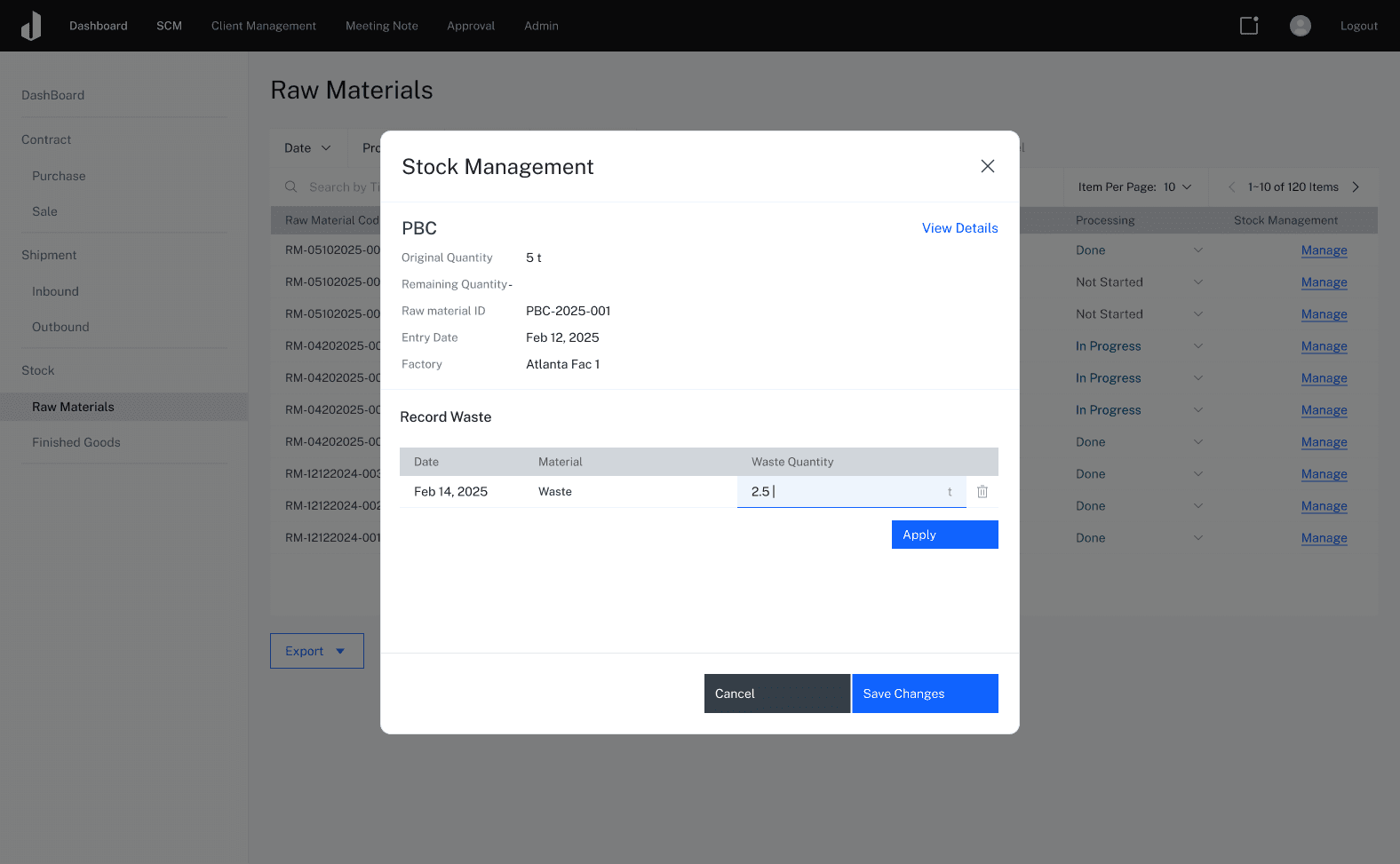
To keep the fundraising MVP feasible, I replaced the comparison with manual entry of actual waste quantities. Each material’s records remained linked by its code through sale, preserving the history needed to support profit-and-loss calculations without relying on predictions.


Waste-entry modal linking actual waste quantities to the material’s unique ID.
Purchase orders
Keeping purchase details and receiving status in one place.
The purchase order experience brings order details, receiving status, and payment status into one view. Users can review existing orders and create new ones with the relevant supplier and material information.


1.
Review and manage purchase orders
Filter orders by date, client, order status, payment status, and warehouse. Review receiving and payment statuses together, or start a new purchase order.

2
Select materials for the order
Choose materials from the existing list by name and product code, or add a new material when needed.
Inbound Shipment
Connecting incoming materials to their purchase orders.
Once a purchase order is created, users can select it to record an inbound shipment. Linking the shipment to its order keeps the incoming materials and their receiving status connected to the original purchase details.

1
Review inbound shipments
View incoming materials, arrival dates, quantities, and assigned staff in one list. Update each shipment’s status directly from the table.

2
Select the related purchase contract
Choose the purchase contract associated with the incoming materials to link the new inbound record to its source.
3
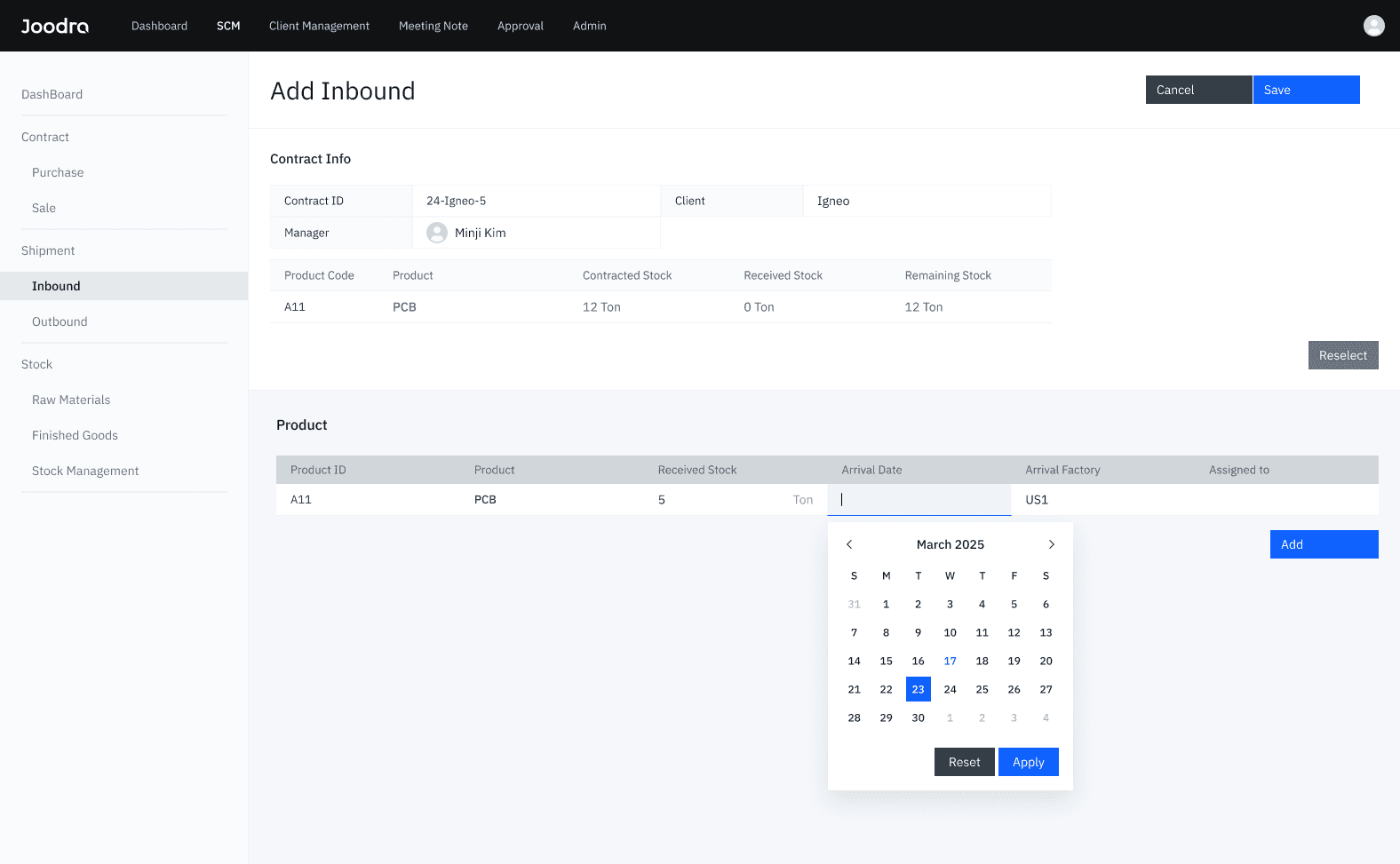
Record the received quantity
Review the contracted and previously received quantities, then enter the quantity received in this delivery.
Raw material stock
Managing materials according to their processing routes.
Materials require different handling: shredding, separation, or direct storage. I designed the inventory workflow to reflect these routes, keeping each material’s processing type alongside its stock information.

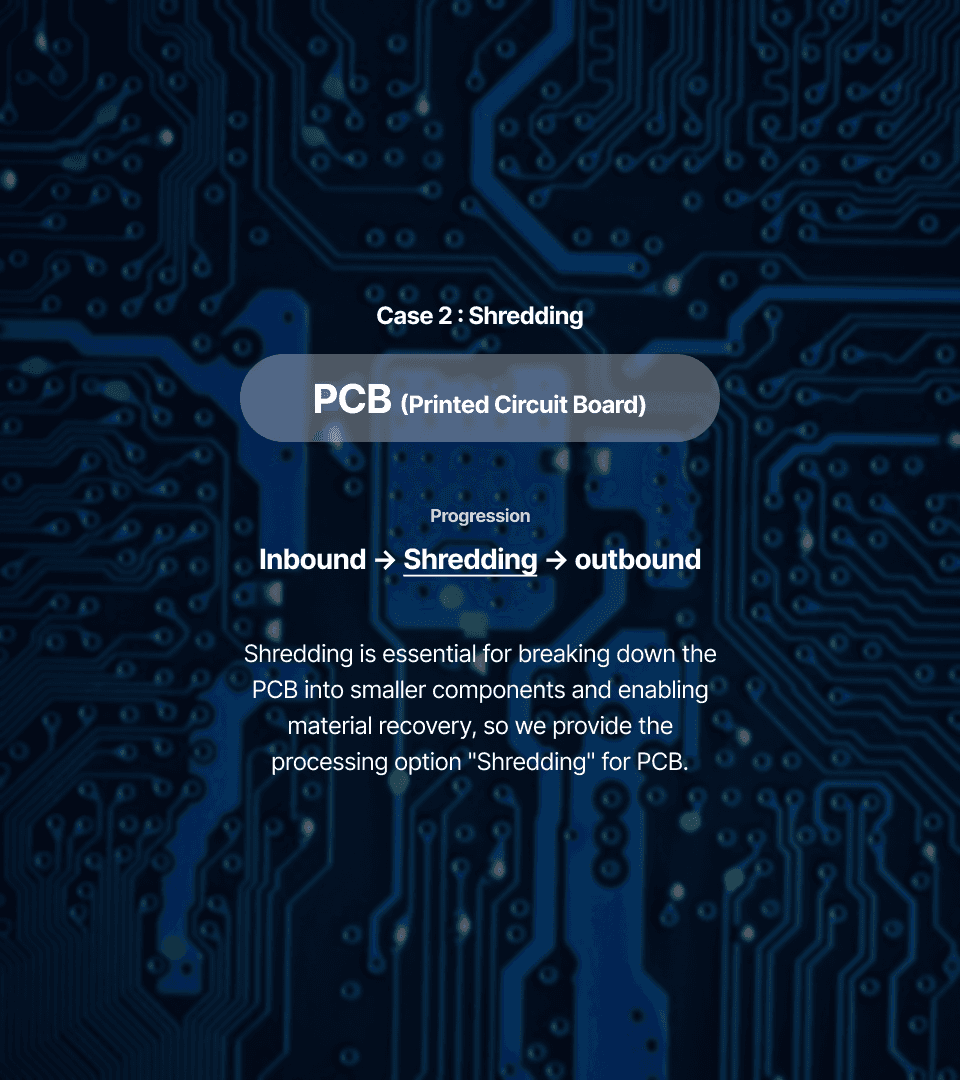
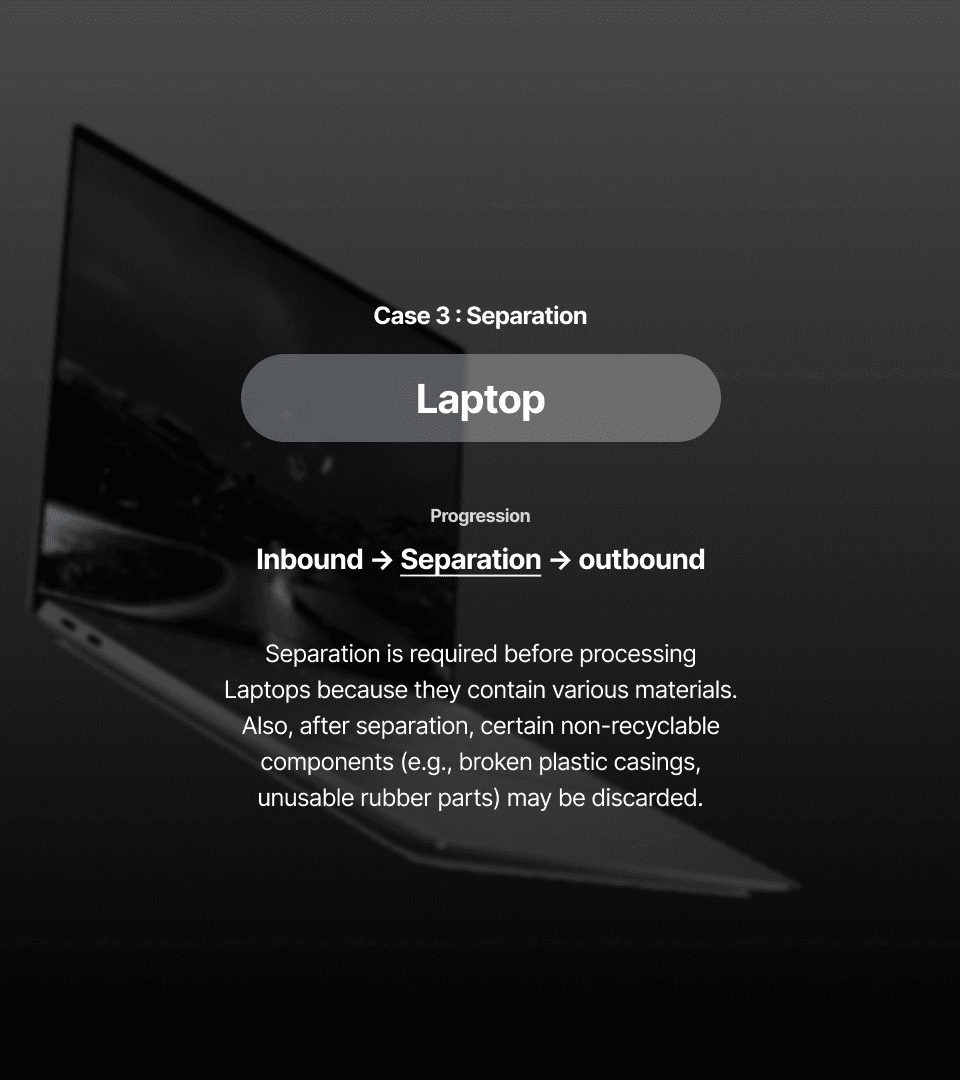
Three types of processing presented in the investor pitch deck.
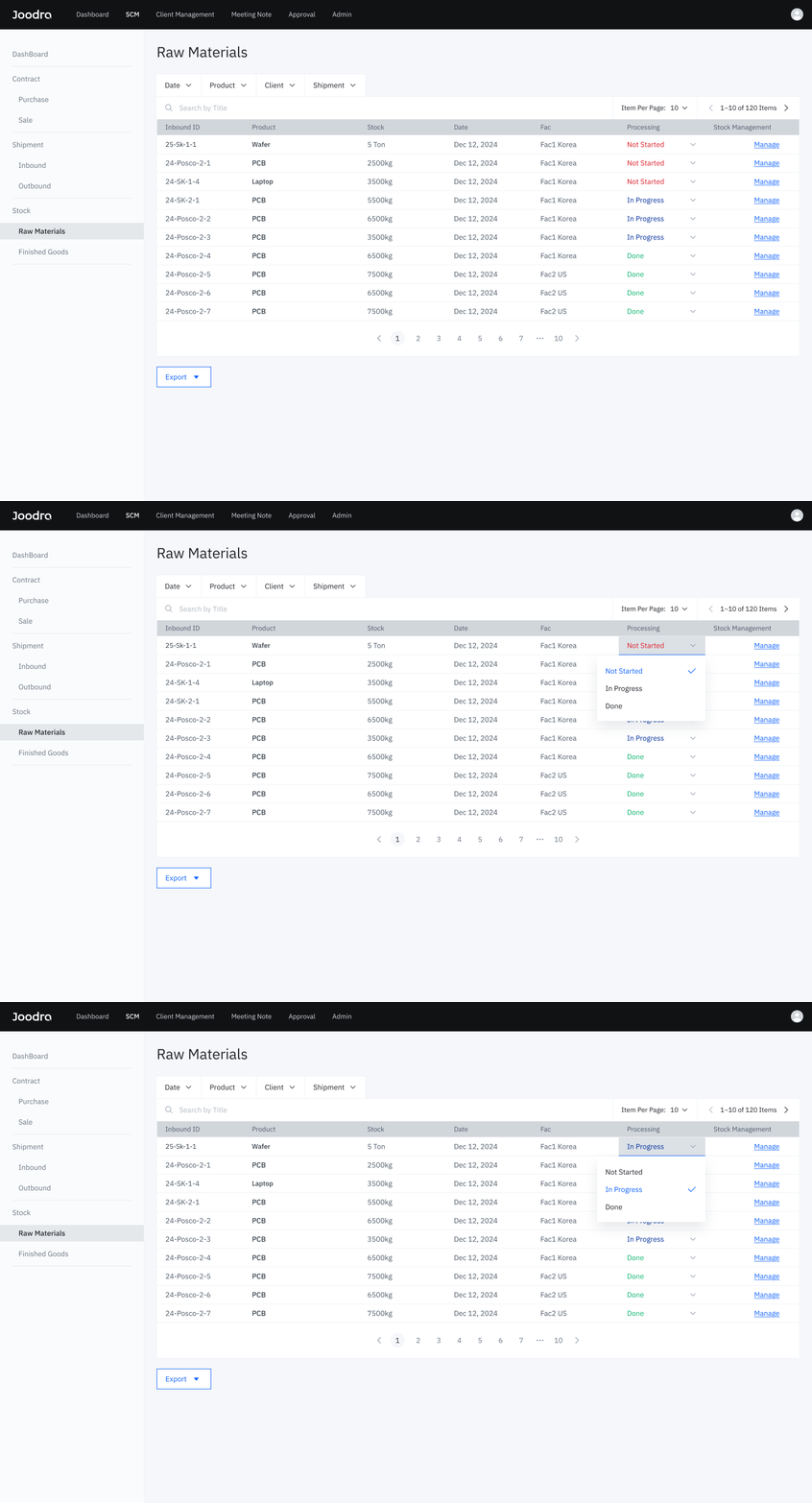
Raw material stock
Wafer processing : Direct storage
I brought material identifiers, stock quantities, and processing status into one list, giving users an overview before opening each material’s detailed records.
1
Wafer processing: Direct storage
The direct-storage route accommodates materials that require no shredding or separation.
2
PCB processing : Shredding
I linked waste quantities and processing status to each PCB material code, preserving a traceable record of shredding.

3
Laptop processing : Separation
Separate entries for discarded materials keep waste details visible alongside remaining stock, while maintaining their connection to the original laptop material code.
Visual design
Giving the product a visual identity for its investor presentation.
Alongside the MVP and working prototype, I designed the product logo. The logo combines the “J” in Joodra with forms inspired by stacked data and a factory, connecting the software to the operation it supports.

Pitch deck
Making a complex product clear to investors.
I designed the investor pitch deck to explain the product’s purpose and core workflows. Process diagrams and MVP screens showed how purchasing, receiving, processing, and sales connect within Joodra Works.

SCM workflow presented in the investor pitch deck.

View the full pitch deck (PDF) ↗
Outcome
Now in operational use at the U.S. office.
The startup secured investment during the project. Following further development, the platform is now used in daily operations at the U.S. office.